Skip to content
Black Friday · −50 % off your first invoice on Xeon VPS with code BF50XEON, −30 % off our other services with BF30 · domain names and dedicated servers excluded See our plans
CloudFive
Log in

Windows VPS, ready in minutes.

Windows Server preinstalled, remote desktop and licence included, on Ryzen 9 9950X and NVMe.

From €8.50 per month, no commitment.

Processor
Ryzen 9 9950X

The same Ryzen 9, from the first tier to the last.

Network
1 Gb/s

A gigabit link per machine.

Protection
Anti-DDoS included

Filtered upstream, before it reaches your server.

Infrastructure
France

Low latency, data under French law.

Choose your VPS.

Included in every plan From the first tier to the last, at no extra cost.
  • Ryzen 9 9950X processor
  • 1 Gb/s network
  • Basic DDoS protection
  • No commitment
  • 7/7 support

Included in all 6 plans

Windows VPS plan comparison
Feature Windows VPS Start €8.50/month Windows VPS Plus €15.00/month Most popular Windows VPS Pro €22.00/month Windows VPS Elite €35.00/month Windows VPS Ultra €55.00/month Windows VPS Infinite €90.00/month
vCPU 2 2 4 8 12 16
RAM 4GB DDR5 8GB DDR5 16GB DDR5 24GB DDR5 32GB DDR5 64GB DDR5
Storage 80GB NVMe 120GB NVMe 160GB NVMe 200GB NVMe 260GB NVMe 320GB NVMe
Order Order Order Order Order Order Order

Available operating systems

Choose your distribution when ordering, and reinstall it from the customer area whenever you like.

  • Windows Serverpreinstalled, licence included
  • Remote desktopRDP access from delivery
  • Other systemon request, by ticket

Full root access, dedicated IP and console on all distributions.

After you click Order
  1. Payment in your CloudFive customer area (manager.cloudfive.fr), by card, or PayPal via the team.
  2. Automatic setup: the service is created right after payment.
  3. Everything is managed in the customer area: console, files, backups and access. An email lets you know as soon as the service is ready.
  4. Need help with the first setup? Open a ticket or join the Discord, we'll guide you.

You can change plan anytime from the customer area, without losing your data. Prices include all taxes, no setup fees.


Customer area

A VPS you manage without opening a ticket.

Reinstall, take back control via the console, open a port, understand overconsumption: it all happens from the machine page.

The VPS page starts with the essentials: status, live resources and, when relevant, a diagnosis in plain French: processor saturated for a quarter of an hour, disk almost full, unusual outbound traffic. The start and stop buttons are right next to it.

On the Windows plan, the console shows the machine's screen with a button to send Ctrl+Alt+Delete, and reinstalling offers Windows Server. Remote Desktop access is shown on the machine page as soon as it is delivered.

The same screens in the iPhone and Android app. See the app

Customer area screenshot: Status
The machine's status, and what is wrong.Resources refresh every two seconds. When a threshold is exceeded for long enough, a line tells you in words, not a red icon.
Customer area screenshot: Reinstall
Reinstall, without asking anyone.You choose the system from those actually offered on your plan. A backup is offered first, and you retype the machine's name to confirm.
Customer area screenshot: Protection
What the filter did for you.Each address has its own Protection tab: current status, attacks this month, rejected traffic, and a log of every attack with its reason in plain French.

Customer area screenshots, from a demo account.

From the VPS page
  • Overview: status, live resources, diagnostics
  • Emergency console, even without network
  • Reinstall from the systems offered with the plan
  • Snapshots before a risky change
  • Network: IP, reverse DNS, rule-based firewall
  • Hot tier upgrade, with the prorated amount shown before you confirm

Included, no add-on

The protection is written by us.

No subscription to a third-party provider: anti-DDoS filtering is our own code, which reads every packet before the network stack. Six profiles depending on use, one setting per service — and for a VPS, a profile built for this traffic.

See what we block, live
Attack packets filtered out, per secondpeak per half-hour, last few days · measured on our network, updated every minute
01 k2 k3 kNov 7Nov 8Nov 9Nov 10
Peak of 3,000 packets/s on 8 November at 1:27 pm, filtered out without cutting legitimate traffic.

They host a server with us.

Public reviews left on Trustpilot, unedited. The rating and count are today's.

4.7/5 124 reviews on Trustpilot
Bientôt 1 mois chez CloudFive (offre expert) et je renouvellerai avec plaisir ! Offre au top, support 5 étoiles, conseils et accompagnement au top ! Je ne peux que recommander !
Looks GAug 2026
Service rapide et efficace. En cas de problème staff extrêmement réactif, même à des horaires de nuits. Serveur sans aucun lag, il ne ram pas d'un pouce pour un serveur milieu d'offre chez eux.
TheBadAssJun 2026
Très bon hébergeur, ils ont été là pour aider à régler mes soucis. Ils arrangent leur client quand ils peuvent. Je recommande
Sao__OXYOct 2026
Héberger, au top. Niveau, rapidité sur les tickets, problème & question. Toujours, aussi rapide ! Rien, n'as dire. Je vous le recommande à 100%.
Nolhan VandammeJul 2026
Super réactiviter malgrer l'heure + ils ont été super efficace a peine 2min et tout revient a sa place je recommandee
Sofian BerkaneAug 2026
Rapport qualité prix exceptionnel
ElvineAug 2026
Personnels réactif, et à l'écoute. A su corriger mon erreur.
Enzo ChalendarAug 2026
Service Client tres reactif prix en charge en 5 minute avec resolution de problème je recommand.
Slowcat _Jun 2026
Super merci pour votre réactivité. Merci à Mathéo THOMAS qui a géré pour mon petit soucis
crible FractureAug 2026

Choosing well

Which Windows VPS for your use.

Windows Server is delivered installed, licence included, with Remote Desktop open from delivery. Windows needs more memory than Linux: size accordingly.

  • Business software or remote desktopWindows VPS Plus (8 GB) for a comfortable session and a few applications.
  • Game server on WindowsFor a game whose server only exists on Windows, aim for 16 GB or more depending on the game.
  • Licence includedNo Windows Server licence to buy separately: it is included in the price.
  • Emergency consoleThe machine's screen from the customer area, with a button to send Ctrl+Alt+Delete.
Good to know

A Windows VPS in France, what you need to know.

Windows Server rather than Windows 11

Our Windows VPSs come with Windows Server, the edition of Windows built for servers. Its interface is close to Windows 10 and 11: Start menu, File Explorer, Task Manager, PowerShell. You will find your way around without a learning curve.

It adds what a server needs: Remote Desktop enabled, roles such as IIS to host a website, and update management suited to a machine that is always on. Most Windows desktop software installs on it; for a specific application, check with its vendor that it supports Windows Server.

What a Windows VPS is for

  • Business or accounting software that only exists on Windows, reachable from any device.
  • A remote workstation: your Windows tools from a Mac, a tablet or a phone.
  • Automation: PowerShell scripts, scheduled tasks, bots that must keep running without your own computer switched on.
  • A game server whose server version only exists on Windows.
  • An ASP.NET site on IIS, or a test environment for a Windows application.

Sizing memory and storage

Windows Server uses more than Linux before your applications even start. For a comfortable session with a few programs, plan at least 8 GB: that is the Plus plan. For a game server on Windows, aim for 16 GB or more depending on the game.

Storage matters too: Microsoft requires at least 32 GB for the system alone, and updates need more. Windows plans have larger drives than Linux VPSs at the same level, from 80 GB to 320 GB NVMe. The Ultra plan also goes up to 12 vCPUs, for software that makes use of them.

Sessions, licences and security

The included licence is the Windows Server licence. It allows two simultaneous Remote Desktop sessions, intended for administration. For more people to work at the same time, Windows requires the Remote Desktop Services role and access licences (RDS CALs): talk to support before ordering. Any software you install keeps its own licence terms.

Remote Desktop listens on port 3389, one of the most targeted ports on the internet. Change the password you received on delivery, keep Network Level Authentication (NLA) enabled, and restrict this port to your own IP addresses in Windows Firewall.

Let Windows Update install security patches, but choose when restarts happen: an off-peak window avoids cutting off software or a game server while it is in use. Before a major update or a heavy software install, a snapshot from the customer area lets you roll back.

The CloudFive Windows VPS

  • Windows Server installed, licence included, and Remote Desktop ready on delivery: the address and username are on the VPS page;
  • Ryzen 9 9950X, DDR5 memory and NVMe storage, from 2 to 16 vCPUs and from 4 to 64 GB;
  • a 1 Gb/s network and anti-DDoS included, in France;
  • the emergency console, with a button to send Ctrl+Alt+Del when Remote Desktop stops responding;
  • no commitment, with support 7 days a week.

Step-by-step instructions for every device are in the guide connecting with Remote Desktop; to decide between the two systems, see Linux or Windows VPS.



Frequently asked questions.

Which payment methods do you accept?

By card (CB, Visa, Mastercard, Apple Pay) or SEPA direct debit, on a secure payment page, and with your account credit. PayPal payment is handled with the team: open a ticket with the invoice number.

Can I host several services on the same VPS?

Yes, as long as resources allow, you can install several services on the same VPS.

Are your VPS protected against DDoS attacks?

Yes, all our VPS include Anti-DDoS protection to ensure optimal availability.

Is the included anti-DDoS protection enough for a game server?

The included protection filters common attacks. Your game's own filter (FiveM, Minecraft, Garry's Mod…), which recognises its traffic, is paid on a VPS: it is part of Premium Protection, at €25/month, which also adds advanced settings (traffic caps, countries, per-port access) and is enabled from your VPS's Protection page. On our game plans, this protection is included.

Can I migrate from another host?

Yes, we can help you migrate from another provider. Contact our support.

Want technical support?

Our support is available via ticket to answer your technical or sales questions.

Can I cancel my service at any time?

Yes, our plans have no commitment. You can cancel anytime from your customer area.

How do I connect to my Windows VPS?

With Remote Desktop (RDP), built into Windows and available on macOS, Linux, iOS and Android. The address and username are shown on the VPS page as soon as it's delivered.

Is the Windows Server licence included?

Yes, the licence is included in the price of each tier. You have nothing to buy separately.

Can I go back to Linux?

Yes: reinstalling from the customer area also offers Debian, Ubuntu and AlmaLinux.

Can I get Windows 11 on a VPS?

Our Windows VPSs come with Windows Server, the edition of Windows built for servers. Its interface is close to Windows 10 and 11, and most Windows desktop software installs on it. For a specific application, check with the vendor that it supports Windows Server.

Can several people work on the Windows VPS at the same time?

Windows Server allows two simultaneous Remote Desktop sessions, intended for administration. Beyond that, you need the Remote Desktop Services role and access licences (RDS CALs): talk to support before ordering.

Do my programs keep running when I close Remote Desktop?

Yes: closing the window leaves the session open on the VPS, and you find your programs again when you reconnect. To close everything, choose Sign out from the Start menu.

Can I host a game server on a Windows VPS?

Yes, it is the right choice if the game's server only exists on Windows: aim for 16 GB of memory or more. If the game has a Linux version, a Ryzen VPS running Linux leaves more resources for the game.

Why choose a Windows VPS in France?

For latency: a server close to you makes Remote Desktop more responsive, and a game server smoother for players in France. Your data also stays under French law.

Support CloudFive AI

An answer right away, a real team behind it.

CloudFive AI answers you at any hour, in seconds. When it doesn’t know, or as soon as you ask, the team that runs the machines takes over. No offshore call centre.

  • TicketThe team replies in under 2 hours, 7 days a week.
  • CloudFive AIAt any hour, on ia.cloudfive.fr, Discord and in your customer area.
  • DiscordThe team, the AI and other customers, in the help channel.
  • Your data stays with usAI runs on our servers in France; e-mails, IPs and passwords are masked.
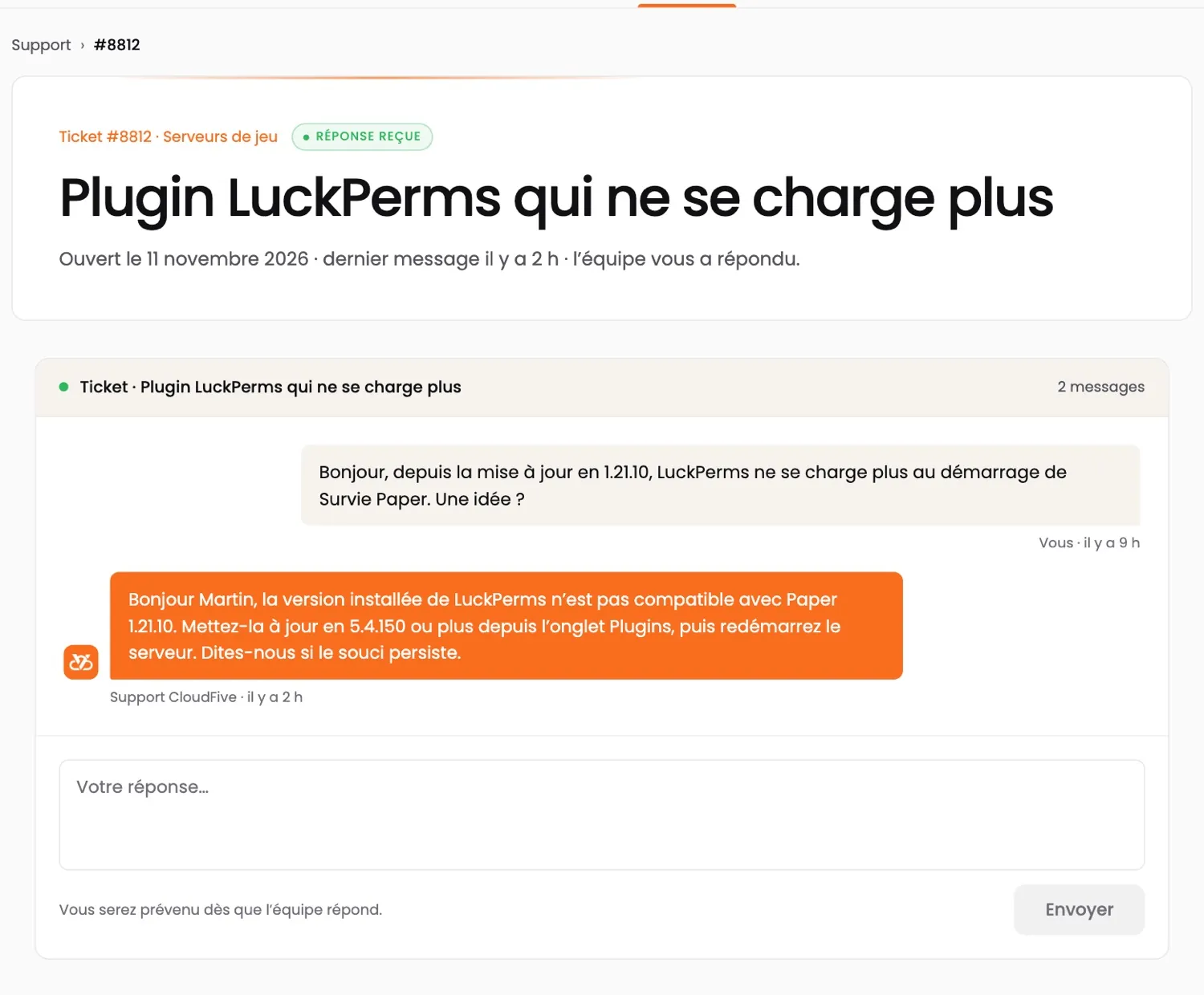
A ticket in the customer area: a customer’s question about a Minecraft plugin, and the CloudFive team’s reply
A real ticket in the customer area, answered by the team (demo account; shown in French).
CUSTOMER AREA · APP

Your servers.
At your fingertips.

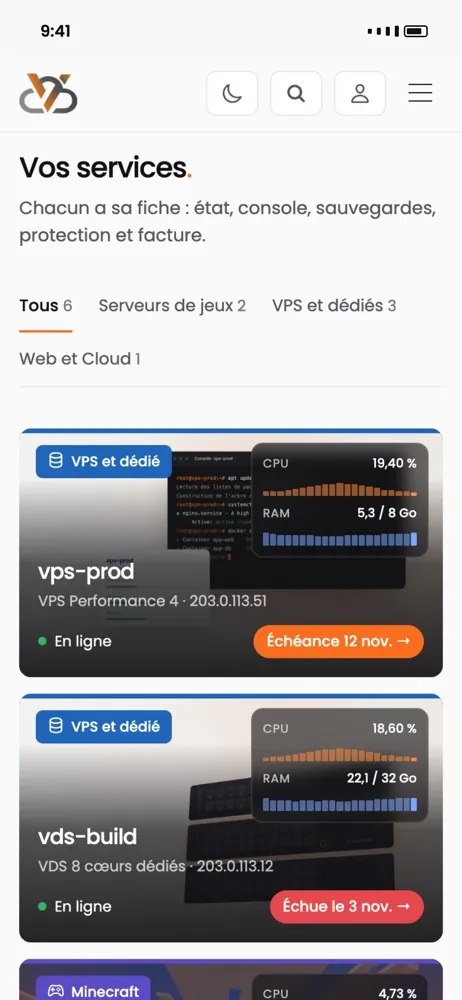
Restart a server, watch its resources live, pay an invoice or open a ticket — and get an alert when something goes wrong.

  • The status of all your services at a glance
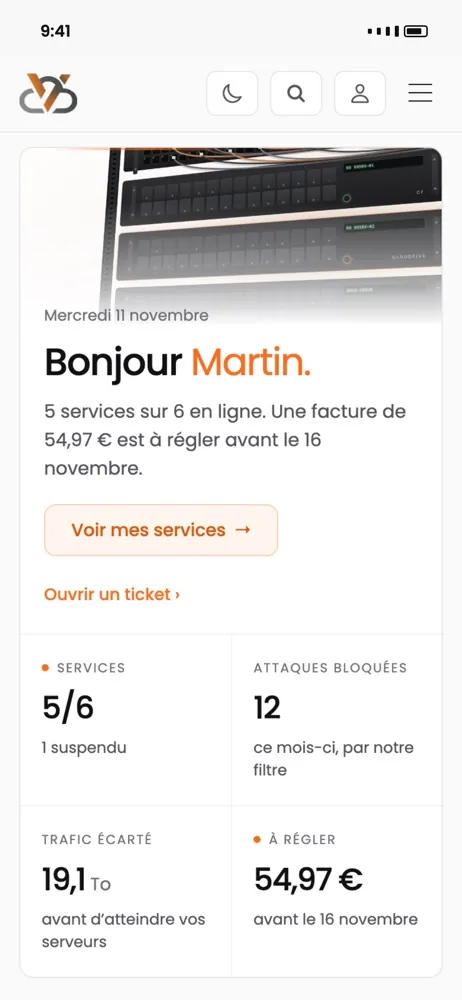
  • Blocked attacks, filtered traffic, monthly peak
  • A notification when a server goes down or an invoice is due

App coming soon · in the meantime, everything works in your browser at manager.cloudfive.fr

The CloudFive app: the list of your services, with their status
The CloudFive app: the home screen, your services’ status, blocked attacks and an invoice to pay